MiniMax H3 Developer Guide: Architecture, 3 Use Modes, and 2K Workflow
A technical walk-through of MiniMax H3: the three-stage pipeline, the 33B dense H3-Base Omni Transformer, T2VA vs FL2VA vs Ref2VA, and the full 2K regeneration workflow with local and cloud pieces.
%22%2F%3E%3Ctext%20x%3D%2250%25%22%20y%3D%2250%25%22%20font-family%3D%22Manrope%2C%20sans-serif%22%20font-size%3D%2264%22%20font-weight%3D%22700%22%20fill%3D%22rgba(255%2C255%2C255%2C0.85)%22%20text-anchor%3D%22middle%22%20dominant-baseline%3D%22middle%22%3EH3%20Architecture%20Guide%3C%2Ftext%3E%3C%2Fsvg%3E)
MiniMax H3 is a universal full-modality video generation system. It takes text, image, video, and audio as a single context, understands the relationships between them, and produces a 2K, 15-second, native-stereo-audio video. The architecture is the part most users never see but the part that explains every decision MiniMax made in the last twelve months. This guide walks through the three-stage pipeline, the 33B dense H3-Base Omni Transformer inside it, the three use modes (T2VA, FL2VA, Ref2VA), and the full 2K workflow that combines local generation with cloud regeneration.
If you are not a machine-learning practitioner, you can stop after the use-modes section and use videobao for the rest. If you are integrating H3 yourself, the rest of the article is for you.
The Three-Stage Pipeline at a Glance
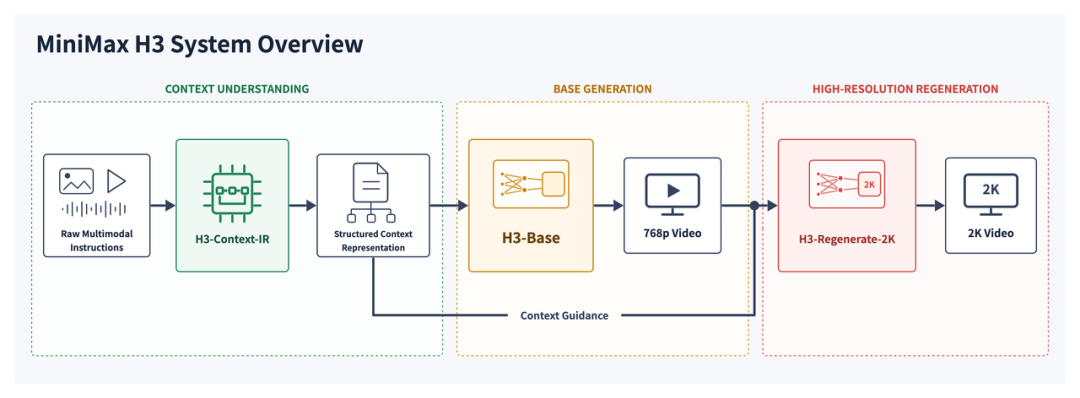
H3 is not one model. It is three modules wired together: H3-Context-IR, H3-Base, and H3-Regenerate-2K. The pipeline takes raw multimodal instructions on the left and produces a 2K video with synchronized audio on the right.
H3-Context-IR parses whatever the user throws at the model. Text, image, video, audio, or any combination. The output is a structured Context Intermediate Representation that downstream stages can consume. H3-Base then generates a 768p video with audio from that representation, and H3-Regenerate-2K takes the 768p output, fuses it back with the original context, and re-renders at 2K. The regeneration step is what makes 2K feel sharp instead of upscaled, because the model still has the full original context to draw on while it refines.
Think of it as a three-step recipe: understand the brief, draft a low-res version, then re-draft at full resolution with the brief still in view. The same pattern works in film production and design. H3 just makes it a single API call.
Inside H3-Base: 33B Dense, One Stream, Joint Video-Audio Denoising
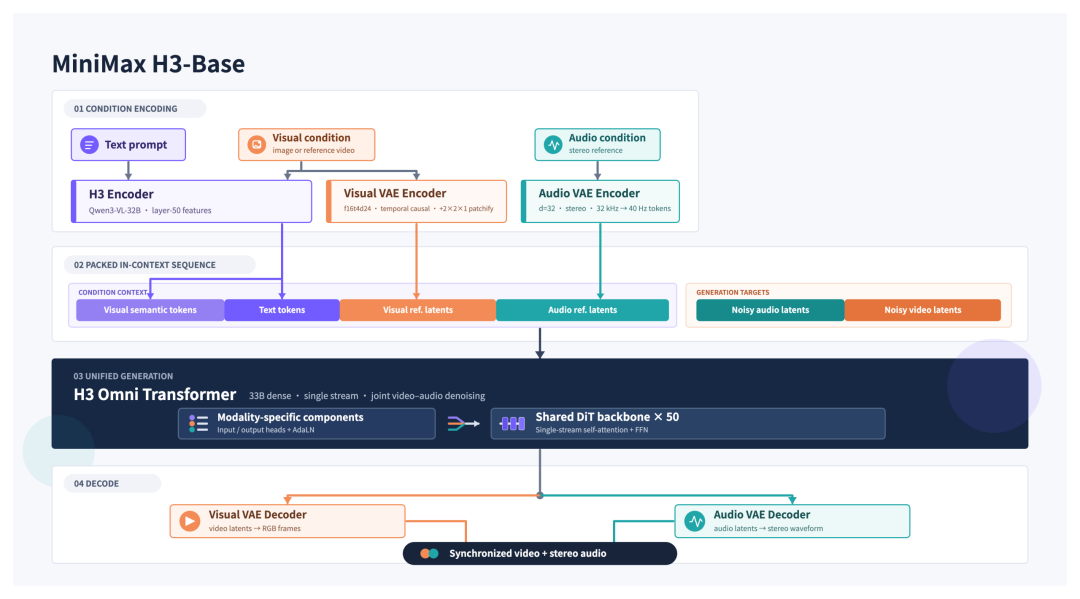
H3-Base is the heart of the system. It is a 33-billion-parameter dense transformer that denoises video and audio latents in a single stream, using a shared DiT backbone with 50 layers.
Three encoders feed it. The H3 Encoder is built on Qwen3-VL-32B at layer 50 and produces text tokens. The Visual VAE Encoder runs at 16x16x24 with temporal causality and a 2x2x1 patchify, producing visual reference latents. The Audio VAE Encoder runs at d=32, stereo, 32 kHz, 40 Hz tokens. The four token streams are packed into a single in-context sequence, with noisy video and noisy audio latents appended on the generation side. That single sequence is what the transformer denoises.
The architecture choice that matters is the modality-specific components on top of a shared backbone. The base DiT is shared across video and audio, which is why the model can keep the two in sync without an extra alignment module. The two decoders are still separate: a Visual VAE Decoder that maps video latents back to RGB frames, and an Audio VAE Decoder that maps audio latents to stereo waveform. The output is a synchronized video-plus-stereo-audio pair, generated in one pass.
Three Use Modes: T2VA, FL2VA, Ref2VA
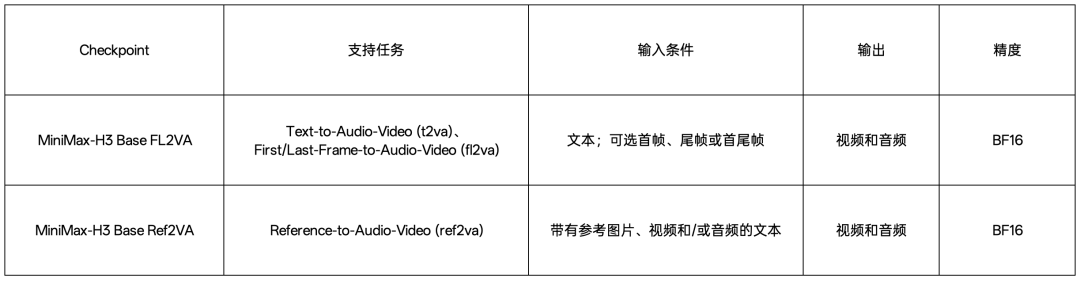
H3 ships two open-source checkpoints, each tuned for a different use mode. Both produce 768p video with audio in BF16 precision. The difference is what they accept as input.
H3-Base-FL2VA is the first/last-frame mode. It accepts text plus zero, one, or two reference images. Zero images means text-to-audio-video (T2VA). One image can be a first frame (I2VA from a head frame) or a tail frame. Two images means first-and-last-frame interpolation. Use FL2VA when the user has a clear start and end in mind and wants the model to fill the in-between motion.
H3-Base-Ref2VA is the reference-driven mode. It accepts text plus up to 9 reference images, up to 3 reference video clips (each 2-15 seconds, total not exceeding 15 seconds), and up to 3 reference audio clips (each 2-15 seconds, total not exceeding 15 seconds). Audio must be paired with an image or video - it cannot stand alone. The total across all input types caps at 12 files. Ref2VA is the mode for character-consistency, voice-cloning, scene transfer, and complex edits where you want to reuse pieces of existing footage.
The Full 2K Workflow: Local Base plus Cloud Regeneration
The 768p output from H3-Base is the local, fully open-source path. The 2K path combines local H3-Base with two cloud APIs: H3-Context-IR and H3-Regenerate-2K. Both are hosted by MiniMax.
The three stages line up with the pipeline diagram. First, H3-Context-IR takes the user input and produces the expanded prompt that H3-Base and H3-Regenerate-2K will consume. Second, the locally deployed H3-Base renders a 768p video with audio from that expanded prompt. Third, H3-Regenerate-2K takes the 768p result as a base_video, re-combines it with the expanded prompt and the original user context, and re-renders at 2K. The regeneration step is what carries the original semantic context into the high-resolution pass, which is why the 2K output feels like a refinement rather than an upscale.
Three 2K cases ship in the official model card: T2VA (text only, full chain), I2VA (text plus a first frame, full chain), and Ref2VA (text plus reference clips, full chain). For each case the model card provides both a local-only 768p run and a 2K run via the API, so the developer can verify that the local path matches the cloud path on a known reference output.
For production: in the example code, the local H3-Base output is base64-encoded as a Data URL and passed to H3-Regenerate-2K. In a real deployment, you upload the 768p video to any public URL and pass the URL as base_video instead. That is the only meaningful plumbing change between the example and production.
Spec Cheat Sheet
Output duration: 4 to 15 seconds. Aspect ratios: 21:9, 16:9, 4:3, 1:1, 3:4, 9:16. Resolution: 768p by default; 2K via H3-Regenerate-2K. Frame rate: 24 FPS. Audio: 32 kHz stereo, native to the model.
Stable language support covers 11 languages: Arabic, Chinese, English, French, German, Italian, Japanese, Korean, Portuguese, Russian, and Spanish. Other languages get partial support. License: MiniMax H3 Community License (open-source, but not permissive in the Apache sense - read the model card before shipping a commercial product on top of it).
Where to get the weights: Hugging Face at huggingface.co/MiniMaxAI/MiniMax-H3 and ModelScope at modelscope.cn/models/MiniMax/MiniMax-H3. The full request parameters, the H3-Context-IR prompt, and the regeneration code are in the Hugging Face model card.
On videobao: What Is Live, What Is Next
H3 is live on videobao today. The integrated use modes cover the full H3-Base surface: text-to-video; first-frame, last-frame, or first+last-frame image-to-video; and reference-driven mode with up to 5 reference images plus optional reference video and audio clips. Pick the mode that fits the brief, drop in frames or references, generate a 2K clip, ship it. Pricing is 7 credits per second for native 2K, with a 4 to 15 second duration range. H3 is premium-tier on videobao because 2K generation is meaningfully more expensive than 1080p.
All three modes ship behind the same generation flow. The reference-driven mode is what unlocks character-consistency across shots, voice cloning for product ads, and complex multi-source editing, and it is already live on videobao alongside the first/last-frame paths, so the same prompt-plus-references pattern works whether you are using H3 today or any of those modes tomorrow.
Local Deployment, Resources, and What to Read Next
For local deployment, you need a multi-GPU box. The 33B dense transformer is small by 2026 frontier standards but it still wants serious VRAM. The model card walks through the exact inference configuration, the vLLM-style serving setup, and the BF16 precision assumptions. Read the model card end-to-end before you commit to a deployment target.
Resources: the Hugging Face model card is the source of truth (huggingface.co/MiniMaxAI/MiniMax-H3). ModelScope mirrors the weights for users in China (modelscope.cn/models/MiniMax/MiniMax-H3). The MiniMax platform docs cover the cloud APIs for H3-2K Direct, H3-Context-IR, and H3-Regenerate-2K at platform.minimaxi.com/docs/api-reference. For the underlying lab, hailuoai.com is the consumer-facing entry point.
If you only need H3 for production work and do not want to host it, the videobao generation panel is the fastest path. If you want the full control of a local deployment, the model card plus the platform docs will get you to a 2K pipeline in a day.
%22%2F%3E%3Ctext%20x%3D%2250%25%22%20y%3D%2250%25%22%20font-family%3D%22Manrope%2C%20sans-serif%22%20font-size%3D%2264%22%20font-weight%3D%22700%22%20fill%3D%22rgba(255%2C255%2C255%2C0.85)%22%20text-anchor%3D%22middle%22%20dominant-baseline%3D%22middle%22%3ERemove%20Watermark%3C%2Ftext%3E%3C%2Fsvg%3E)
%22%2F%3E%3Ctext%20x%3D%2250%25%22%20y%3D%2250%25%22%20font-family%3D%22Manrope%2C%20sans-serif%22%20font-size%3D%2264%22%20font-weight%3D%22700%22%20fill%3D%22rgba(255%2C255%2C255%2C0.85)%22%20text-anchor%3D%22middle%22%20dominant-baseline%3D%22middle%22%3EBest%20AI%20Video%20Generators%202026%3C%2Ftext%3E%3C%2Fsvg%3E)